
AI開発エージェントDevinの実力検証:CLIツールとWebシステム開発を依頼してみた

近年、AI技術の進化は目覚ましく、特にソフトウェア開発の領域では、コーディング支援からプロジェクト管理まで、AIの活用が急速に進んでいます。 中でも、自律的にタスクをこなす「AI開発エージェント」の登場は、開発のあり方を根本から変える可能性を秘めており、大きな注目を集めています。
その代表格として話題沸騰中なのが、Cognition AIが発表したAIソフトウェアエンジニア「Devin」です。 Devinは、プロンプトを与えるだけで、自ら計画を立て、コーディング、デバッグまで行うとされ、その驚異的な能力に期待と関心の声が寄せられています。しかし、実際のところ、Devinはどこまで実用的なのでしょうか?
本記事では、この疑問に答えるべく、AI開発エージェントDevinに具体的な開発タスクを依頼し、その実力を検証します。
今回Devinに挑戦してもらったのは、「CLIツールの開発」と「シンプルなWebシステムの構築」という2つの異なるタイプのプロジェクトです。 果たしてDevinはこれらのタスクをどこまでこなし、どのような成果物を出力するのか、その過程と結果をレポートします。
簡単なCLIツールを開発させてみる
まずはお手並み拝見といきましょう。簡単なCLIツールを作成してもらいます。
作成するツールは、 node_modules の中にある各ディレクトリの容量を計算し、容量降順でソートして表示するだけのものです。
以下のようなイメージです。
$ node ./dist/index.js
1.2MB node_modules/
  600KB 50% node_modules/react/
  400KB 33% node_modules/react-dom/
  200KB 17% node_modules/lodash/
Devinにこのタスクを依頼するにあたり、プロジェクトの初期設定と基本的なファイル構造はこちらで準備しました。 まず、プロジェクトディレクトリを作成し、npmで初期化します。
npm init -y
npm i -D typescript @types/node vite vitest
最低限必要なファイルを用意しました。雛形のみで実装は空です。
.
├── dist
│   └── index.js       #ビルド後
├── package-lock.json
├── package.json
├── README.md
├── src
│   ├── index.ts       # エントリポイント
│   ├── probe.ts       # ディレクトリ操作関係
│   └── probe.test.ts  # テストコード
├── tsconfig.json
└── vite.config.js
Devinが作業しやすいように初期ファイルを用意する
なにもないところから丸投げ!という選択肢もあるのですが、要件が不明瞭なまま走り出してしまうと、 意図しない方向に逸れてしまったときに軌道修正が難しくなります。
そこで大枠のファイルや内容だけ用意して、Devinが全体感を把握しやすい状況から開始する方向性で行きましょう。
まずは README.md に要件を記述しています。
プロンプトに列挙してもよかったのですが、ドキュメントの形で残しておくほうが使い回すことができるので便利です。
今回はプロンプトを英語で記述していますが、日本語でも十分に動作することを確認しています。
# nmprobe

`nmprobe` is a simple tool for inspecting the size of the `node_modules` directory.

## Build

```bash
# It's recommended to run tests before building.
npm run test

# Build the project and generate ./dist/index.js
npm run build
```

## Usage

```bash
node ./dist/index.js [path]
```

- `path`: The directory to analyze. Defaults to the current working directory.

## Outputs

`nmprobe` displays the size and percentage usage of subdirectories within `node_modules`, sorted in descending order by size.

```bash
$ node ./dist/index.js
1.2MB node_modules/
  600KB 50% node_modules/react/
  400KB 33% node_modules/react-dom/
  200KB 17% node_modules/lodash/
```
index.ts も枠組みだけ用意しておきます。中身は特に何も記述していません。
(function main() {

})();
そして容量の計算に必要な関数群をまとめた probe.ts も用意しました。
export interface FileSystemOperations {
  readdirSync: (path: string) => string[];
  statFileSize: (path: string) => number;
  isDirectory: (path: string) => boolean;
}

// Calculates and returns the total size of the specified directory (dirpath) in bytes.
export const calcDirSize = (fsOps: FileSystemOperations, dirpath: string): number => {
  // TODO: implement
  return 0;
}
実装も空っぽでコメントもほとんどありませんが、関数名などから何をするものなのかはだいたい推測できるだろうと考えました。
これに対するテストも用意しておきました。
import { expect, test } from 'vitest';
import { calcDirSize, FileSystemOperations } from './probe.ts';

// TODO: implement
class FakeFileSystemOps implements FileSystemOperations {
  readdirSync(path: string): string[] {
    return [];
  };
  statFileSize(path: string): number {
    return 0;
  };
  isDirectory(path: string): boolean {
    return false;
  };
}

test('', () => {
  // TODO: implement
  expect('A').toEqual('A');
})
テストも空です。なんとなくの雰囲気で意図は伝わるだろうという期待を込めています。
プロンプトを用意する
次にDevinにわたすプロンプトを用意しました。今回は英語で、ある程度具体的で、順序立てたタスクにしてあります。 実際はここまで詳細に書かなくとも、ある程度は空気を読んで対応してくれることも多いのですが、確実な動作確認のために細かく記述しています。
全てを一度に実装してもらうのではなく、まずは interface を通したスタブによる実装と、それに対するテストを実装するよう指示しました。
Please follow the steps below:

1.  Access the `Condisense/devin-test-1` repository.
2.  In `src/probe.test.ts`, implement test cases as follows:
  2.1. Consider typical cases, such as checking whether a given path points to a file or a directory, and whether an entry exists at that path.
  2.2. You do not need to handle edge cases such as invalid path strings or infinite symbolic link loops.
  2.3. The tests are expected to fail at this stage due to missing implementations. You can ignore these failures for now.
3.  In `src/probe.test.ts`, implement each method of the `FakeFileSystemOps` class as follows:
  3.1. `FakeFileSystemOps` should maintain an internal map that associates fake paths with their corresponding fake size and an `isDirectory` flag.
  3.2. Each method in the class should operate based on this internal map.
  3.3. Run the tests to verify that your implementation is working as expected.
4. Once all the steps above are completed, create a pull request with your changes.
Devinにやらせてみる
ようやく準備が整いました!これをDevinに放り込んでみます。一連の動作を動画にしてみたので、お時間ある方はご覧になると分かりやすいと思います。
5分もかからないうちにPull Requestが出来上がってきました。 示した方針に従うのはもちろん、スタブのテストだけしても意味がないことを察して、スタブを使用した実ロジックのほうも実装してテストしてくれていたり、 ファイル名のタイポ(probeをptobeに打ち間違えていることを発見してくれたり、非常に優秀ですね……。
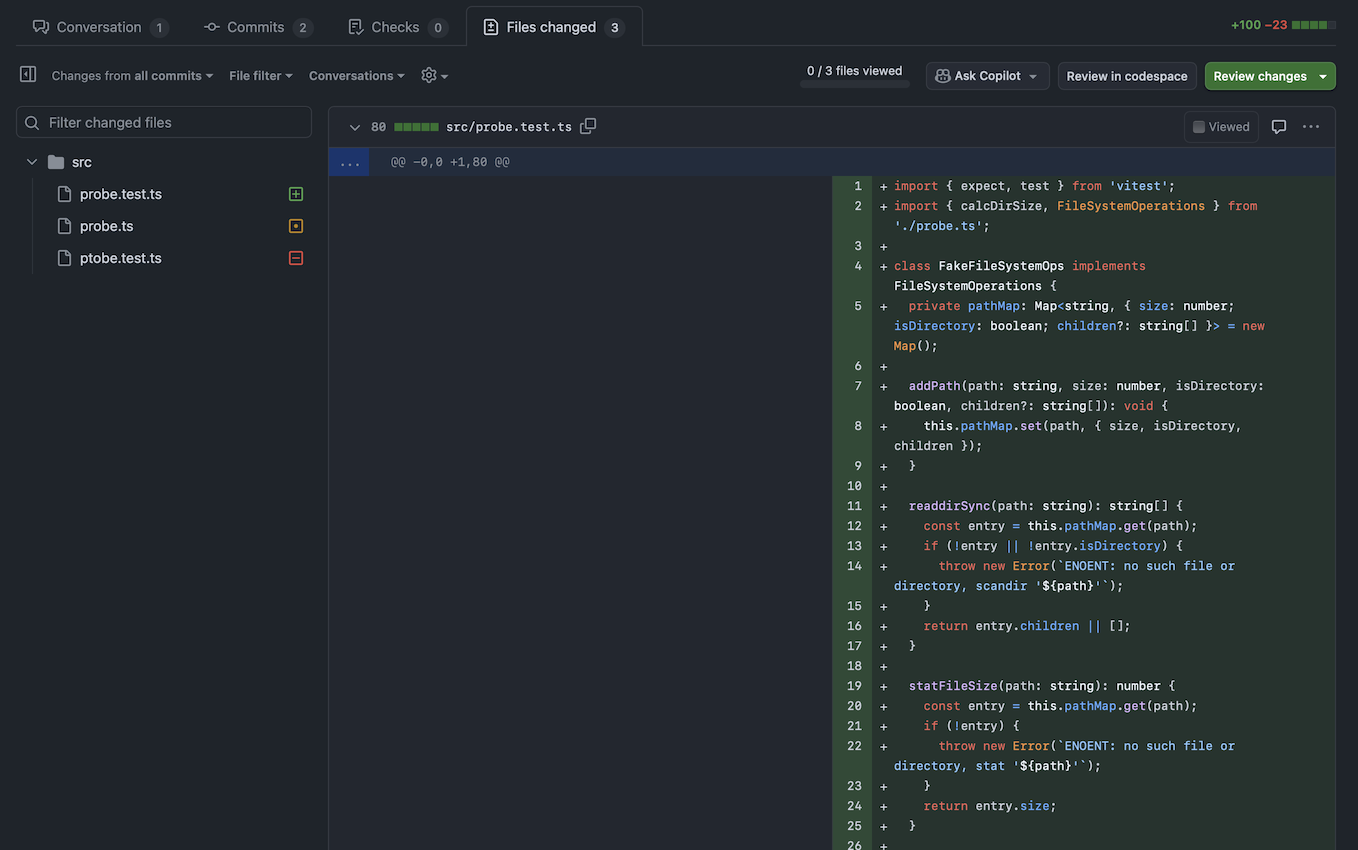
動作確認後、マージしました。これぐらいの作業なら特に修正なく完了してくれるのが素晴らしい点です。
本実装まで一気にやってもらう
スタブを使った実装はできたので、本実装もしてもらうことにしました。 本来はもう少し何フェーズかに分けて指示を出すと良いのですが、横着して一度に依頼しました。
プロンプトは以下のものを使用しました。かなり一気に実装を進めてもらいますが、うまくやってくれるでしょうか。
Task: Implement File System Operations and Directory Size Calculator

Please complete the following steps in order:

Step 1: Repository Access
1.1. Access the `Condisense/devin-test-1` repository

Step 2: Implement `RealFileSystemOperations` in `src/probe.ts`
2.1. Implement the `RealFileSystemOperations` class that satisfies the `FileSystemOperations` interface
2.2. Implement all required interface methods
2.3. Use Node.js standard library modules (`node:fs`, `node:path`, `node:os`) instead of third-party npm packages
2.4. Write some tests for typical use cases using the OS temporary directory (e.g., `/tmp/`)
2.5. Run the tests to verify your implementation works correctly
2.6. Proceed to the next step only after all tests pass

Step 3: Implement Main Logic in `src/index.ts`
3.1. In the main function, call `calcDirSize` from `src/probe.ts` using:
3.2. An instance of `RealFileSystemOperations`
3.3. The current project directory as the target path (this ensures testing with `node_modules` present)
3.4. Verify that `calcDirSize` executes successfully without errors

Step 4: Add Command Line Argument Support
4.1. Modify `src/index.ts` to accept command line arguments
4.2. Extract the first positional argument as the target directory path
4.3. Replace the placeholder path from Step 3 with the command line argument
4.4. Test the CLI functionality to ensure it works properly

Step 5: Finalization
5.1. Once all previous steps are completed successfully, create a pull request
5.2. Once the PR is successfully merged, you'll receive a delicious lemon sherbet as a reward!

Please ensure each step is fully completed and tested before proceeding to the next one.
実際にDevinに任せてみた様子が以下の動画になります。
特に何もせず5分ほど待っているとPRが作られました。 ぼうっと画面を眺めてるだけで実装が進んでいく様はなかなかに背徳感がありました。
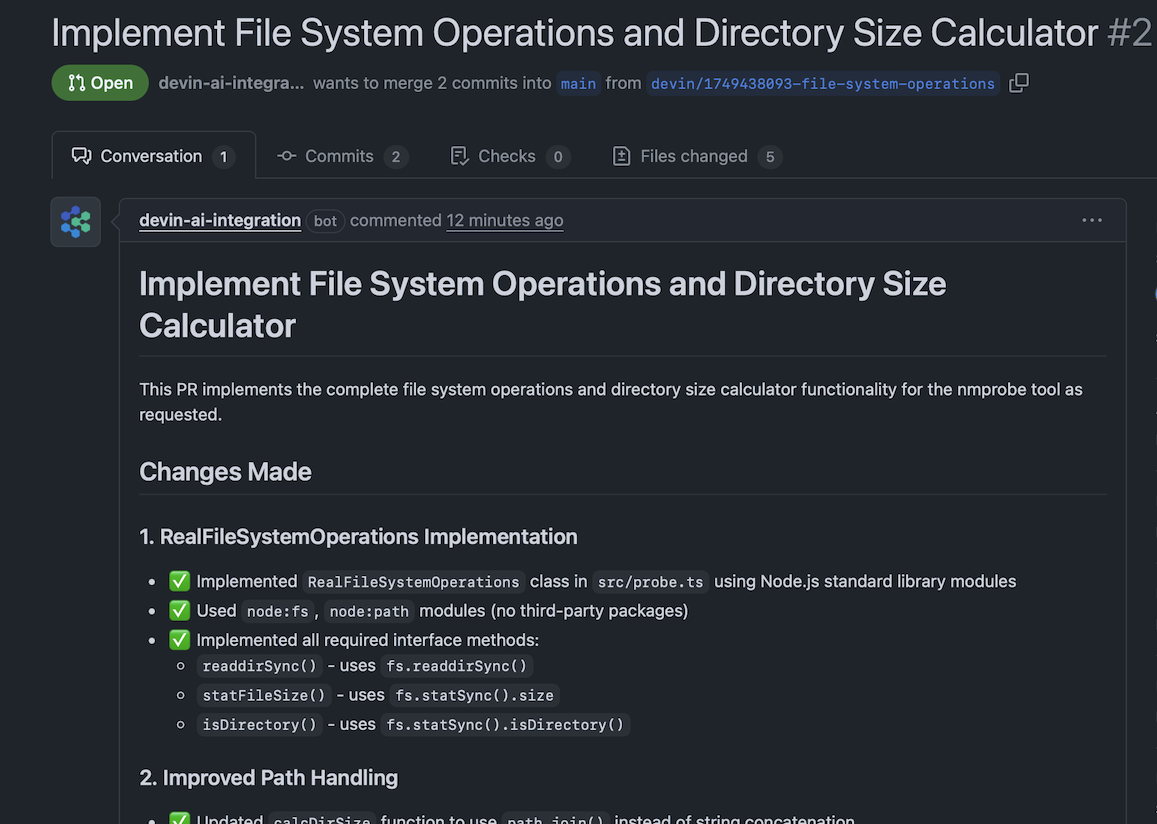
さっそく動作を確認してみましょう。
$ node ./dist/index.js
Total size of devin-test-1: 68068759 bytes
動作はしていますが、当初の要件である node_modules の中のサイズを表示する点と、
容量の表示をBytes単位ではなくKBやMBを使用する点が守られていませんね。
さすがに一度にいろいろなことを任せすぎたかもしれません。しかし、ここまで動くものを作ってくれるのは感動しました。
PRをマージする前に、修正指示を出してみます。対象ディレクトリ、サブディレクトリの計算、サイズの表記の3点を修正してもらいます。
以下のプロンプトで指示を出してみました。
Some of your implementations don't match the app specifications.
Please review the specs in `README.md` and fix the following issues:

1. Target directory correction:
  The app should inspect the size of `./node_modules` within the target path, not the target directory itself.
  For example, when the target is `/aaa/bbb`, the app should inspect the `/aaa/bbb/node_modules` directory.
2. Calculate subdirectory sizes:
  In addition to calculating the total size of `node_modules`, you must also calculate the size of each direct child directory within `node_modules`.
3. Human-readable format:
  Display sizes in human-friendly units (e.g., KB, MB, GB) rather than showing large byte values.
3分ほど待っていると修正がpushされました。修正後のコードを動作させてみます。
正しく動作していることを確認するため、 du コマンドと表示を比較してみます。
# Devinが作ってきたプログラム
$ node ./dist/index.js | head -n7
65MB node_modules/
  22MB 34% node_modules/typescript/
  9MB 15% node_modules/esbuild/
  9MB 15% node_modules/.bin/
  9MB 14% node_modules/@esbuild/
  3MB 4% node_modules/rollup/
  3MB 4% node_modules/vite/

# duコマンドの結果
$ du -h -d1 node_modules | sort -hr | head -n7
 49M    node_modules
 22M    node_modules/typescript
9.5M    node_modules/esbuild
2.7M    node_modules/rollup
2.6M    node_modules/vite
2.4M    node_modules/@types
2.4M    node_modules/@rollup
ターゲットディレクトリの node_modules に対して、そこそこ正しそうな出力が得られました!
差異がある部分は、シンボリックリンクの扱いの違いなどが原因かもしれません。
より修正を重ねて正確にすることも可能だとは思いますがこれ以上深追いはせず、一旦ここまでにしたいと思います。
かなり横着して大きな粒度でタスクを任せましたが、非常にスムーズに実装してくれましたね。
かかったコスト
Devinの料金体系は、ACU(Agent Compute Unit)という計算リソースの消費量に対して課金される仕組みです。
ここまでに消費したACUは以下の通りです。
- スタブとテストの実装
- 0.79 ACU
- 本実装と修正
- 1.15 ACU
- 計
- 1.94 ACU
ACUあたりの料金は2025年7月現在で2.25ドルとなります。1.94 ACUを換算すると約4.365ドルとなりますね。 現在のレートで日本円に変換すると629円ほどです。
この程度の規模のCLIツールなら600円ちょっとで実装してくれるのは、なかなかインパクトがありますね。 しかも特に追加指示を求められることもなく、ただ眺めているだけで完了しました。
Webシステムを開発させてみる
簡単なCLIツールをサクッと作成してくれる点は、本当に素晴らしいです。 しかし実務においてはもう少し実践的なタスクをこなしてくれなければ、安心して導入はできないでしょう。
今度はREST-likeなAPIを通じてCRUD操作ができるバックエンドと、データベース、それを操作するフロントエンドの一般的な構成のシステムを開発させてみましょう。
今回作ってもらうもの
ブックマーク管理システムを作成してもらいます。 このシステムにはウェブサイトのタイトルとURLを登録でき、変更や削除も可能なものとなります。
CRUDをカバーしておりユーザー向けのフロントエンドも存在するという、ミニマムですが一般的なWebシステムに求められる条件はほぼ満たしていると思います。
簡単のために認証認可については一旦スコープから外しています。余裕があれば後ほどそのあたりも検証しましょう。
システム構成
- フロントエンド: Vite + React
- バックエンド: Go +
net/http - データベース: SQLite
フロントエンドとバックエンドで使用する言語が異なり、データベースも存在するというような、一般的な構成にしています。ただし単純にするためにデータベースは本格的なRDBMSを使うのではなく、単一ファイルで管理できるSQLiteを使用します。
ReactやGoを知らない方でも、このまま安心して読み進めてください。 この記事では私たちがコードを書くわけではないので、これら個々の技術に関する具体的な知識は不要です。
初期ファイル
Devinに依頼する前に準備する初期ファイルは最小限にしました。 フロントエンドについてはCLIツールのときとそう変わらないので説明は割愛します。
バックエンドについては、go mod init しただけの状態に、
空のmain関数だけを記述した main.go を置きました。
.
├── frontend/
│   ├── index.ts          # エントリポイント
│   ├── package.json
│   ├── package-lock.json
│   ├── vite.config.js
│   ├── tsconfig.json
│   └── pages/            # 空のディレクトリ
├── backend/
│   ├── main.go           # エントリポイント
│   └── go.mod            # ディレクトリ操作関係
├── .gitignore
└── README.md
README.md には以下のように記載しています。後半はバックエンドとフロントエンドそれぞれ各種開発用のコマンドを列挙しているだけのため、ここでは割愛します。
# Website Bookmark system

## Overview

This system allows users to manage a collection of website bookmarks. It provides functionality to add new bookmarks (title and URL), view the existing list, and edit or delete them as needed. All bookmark data is stored in a database.

## Features

- Add new bookmarks
- View all bookmarks
- Edit bookmarks
- Delete bookmarks

## Technologies

- backend
  - golang
  - REST-like HTTP API
  - `net/http` library
  - SQLite database
- frontend
  - React

## Development

(省略)
かなりざっくりした要件にしましたが、Devinは理解してくれるでしょうか。
DBとAPIの定義をやらせてみる
Devinがこの開発をこなせるか、試していきましょう。 本格的な実装に入る前に、まずはDBのスキーマとAPIの定義をさせます。
プロンプトは以下のようにしました。
Open `Condisense/devin-test-2` repo and proceed with the tasks below by following these steps:

1. Select a parent task from the list.
2. Choose a subtask from the selected parent task and complete it.
3. When a subtask is completed, mark its checkbox.
4. Once all subtasks of a parent task are finished, mark the parent task's checkbox.
5. When all tasks are completed, create a pull request.

Tasks:
- [ ] Define SQLite database schema for bookmarks
  - [ ] Familiarize yourself with `sqlite3` command-line usage (e.g., by running `sqlite3 -h`).
  - [ ] Create the file `./backend/init.sql`.
  - [ ] In `./backend/init.sql`, write a `CREATE TABLE` statement for a `bookmarks` table including the following columns:
    - id, title, url, updated_at, created_at
  - [ ] Create the database file `./backend/db.sqlite` and initialize its schema by executing the `./backend/init.sql` script.
  - [ ] Add `./backend/db.sqlite` to the `.gitignore` file.
- [ ] Define REST-like API endpoints for bookmarks using OpenAPI v3
  - [ ] Create the file `./backend/api-spec.yaml`.
  - [ ] In `./backend/api-spec.yaml`, define the OpenAPI v3 specification for a bookmarks API. This specification should cover the following CRUD operations: create, get single item, list all item, delete
  - [ ] Ensure the API specification details the request and response schemas for each endpoint, consistent with the database schema defined above.
このプロンプトをDevinに入力したところ、5分ほどで完了してPRを作成してくれました。
DBの初期化SQLは以下のものを作ってくれました。
トリガーでの updated_at の更新は業務系ではよく見かける処理ですね。
特に指示していないのにだいぶ気の利いたことをしてくれています。
CREATE TABLE bookmarks (
     id INTEGER PRIMARY KEY AUTOINCREMENT,
     title TEXT NOT NULL,


     url TEXT NOT NULL,
     updated_at DATETIME DEFAULT CURRENT_TIMESTAMP,
     created_at DATETIME DEFAULT CURRENT_TIMESTAMP
 );

 CREATE TRIGGER update_bookmarks_updated_at
     AFTER UPDATE ON bookmarks
     FOR EACH ROW
 BEGIN
     UPDATE bookmarks SET updated_at = CURRENT_TIMESTAMP WHERE id = NEW.id;
 END;
API定義のほうはすべて載せると長くなるので一部抜粋します。無事にRESTっぽい定義をしてくれているのがわかると思います。
openapi: 3.0.3
 info:
   title: Bookmarks API
   description: REST-like API for managing website bookmarks
   version: 1.0.0
   contact:
     name: Bookmark System
 servers:
   - url: http://localhost:8080
     description: Development server

 paths:
   /bookmarks:
     get:
       ...
     post:
       ...
   /bookmarks/{id}:
     get:
       ...
     delete:
       ...
おおむね大丈夫そうですが、プロンプトに更新に関する指示が抜けていたため、bookmarksの更新が足りていませんね。 こういったときは追加のプロンプトを与えることで更に作業をしてもらうことができます。
追加で以下のプロンプトで指示を出しました。進め方は既に示しているため、目的のみを伝えるシンプルな表現にしています。
Create another pull request.
Add a PUT method to the bookmarks/{id} path in the API definition.
This method should handle updates to a bookmark resource.
2分程で無事に PUT メソッドを追加してくれました。
   /bookmarks/{id}:
     get:
       ...
     delete:
       ...
     put:
       ...
Devinがこちらの意図を十分に汲んでくれなかったらどうするのか?という懸念があると思いますが、 こうして簡単な追加指示で修正が可能です。 気楽に依頼して、間違っていたら都度指摘していれば問題にはならないでしょう。
バックエンドの実装をやらせてみる
ここまでの作業で要件もスキーマも明確になったので、ここからは実装をしていきましょう!
あまり細切れにせずに、実装を一気にやらせてみたいと思います。
チェックリストを .md ファイルに保存させて、完了するたびにチェックを記入してもらいつつ進めてもらいます。
プロンプトは以下のものを用意しました。
Open `Condisense/devin-test-2` repo and proceed with the tasks below by following these steps:

1. Create a local file named `.devin-todo.md` and save the following task list in it. Then, add `.devin-todo.md` to the .gitignore file to ensure it's never committed.
2. Select a parent task from the list.
3. Choose a subtask from the selected parent task and complete it.
4. When a subtask is completed, mark its checkbox and save it.
5. Once all subtasks of a parent task are finished, mark the parent task's checkbox and save it.
6. When all tasks are completed, create a pull request.

Tasks:
- [ ] Understand the Backend API Specification
  - [ ] Review `README.md` to understand the service overview.
  - [ ] Review `backend/api-spec.yaml` to understand the API endpoints and data schemas.
- [ ] Implement the Abstract Repository Layer
  - [ ] Initialize the local test database by creating `backend/db.sqlite` using the `sqlite3` command and the `backend/init.sql` script.
  - [ ] Navigate to the `backend` directory and create a `repository` subdirectory.
  - [ ] In the `repository` directory, define a `Bookmark` struct that aligns with the API specification.
  - [ ] In `backend/repository/bookmark.go`, define a repository interface for bookmark operations.
    - [ ] The interface must include methods for creating, retrieving, listing, updating, and deleting bookmarks.
- [ ] Implement the Concrete Repository
  - [ ] Create a concrete implementation of the repository interface that interacts with the SQLite database.
  - [ ] Write unit tests for the SQLite implementation, using a temporary database file for isolation.
  - [ ] Confirm that all tests pass.
- [ ] Implement the API Skeleton
  - [ ] In the `backend` directory, implement stub endpoints using `net/http`.
  - [ ] Each endpoint should correspond to the API specification and return a `501 Not Implemented` status.
  - [ ] Run the server and use `curl` to confirm that each endpoint returns a `501` response.
- [ ] Implement the Full API Logic
  - [ ] Replace the stub implementations in each endpoint with the actual logic using the repository interface.
  - [ ] Test the server's functionality.
    - [ ] Choose a method for end-to-end testing of the HTTP server and state your choice.
      - Option A: Use Go's native testing framework.
      - Option B: Use `curl` and document the test steps in a Markdown file.
      - Option C: Propose and use another effective method.
    - [ ] Write and execute test scenarios using the chosen method.
    - [ ] Confirm that all test cases pass.
10分ほどで出来上がってきました。起動して curl で叩いてみましょう!
$ curl localhost:8080/bookmarks
null

$ curl -X POST -d '{"title": "Google", "url": "https://google.com/"}'  localhost:8080/bookmarks
{"id":1,"title":"Google","url":"https://google.com/","created_at":"2025-06-11T13:10:29.283812+09:00","updated_at":"2025-06-11T13:10:29.283812+09:00"}

$ curl localhost:8080/bookmarks
[{"id":1,"title":"Google","url":"https://google.com/","created_at":"2025-06-11T13:10:29.283812+09:00","updated_at":"2025-06-11T13:10:29.283812+09:00"}]
良い感じに動作しています。しかし項目が存在しない場合に null が返ってくるのは好みではないので、ここだけ修正してもらいましょう。
以下のプロンプトを渡しました。
Ensure that `GET /bookmarks` returns an empty array instead of null when the result is empty.3分ほどで修正を完了してくれました。もう一度 curl を試してみましょう。
$ curl localhost:8080/bookmarks
[]
無事に空配列が返ってきました。好ましくない部分があっても、少しの指示で簡単に修正してくれるのは素晴らしいです。 まずDBスキーマとAPIを先に定義させたおかげか、実装は実にスムーズでした。
フロントエンド
バックエンドができたので次はフロントエンドを作らせてみましょう。 既にAPIの定義や動作するバックエンドがあるため、非常に作りやすい状態だと思われます。思い切って、一度に通しで作らせてみましょう。
以下のプロンプトを使用しました。 今回は簡単な動作確認が目的のため、項目数も多く長くなってしまっています。 実際にみなさんが使用するときは、より明確に小さなスコープを定めて依頼するとよりDevinの能力を引き出しやすくなります。
Open `Condisense/devin-test-2` repo and proceed with the tasks below by following these steps:

1. Create a local file named `.devin-todo.md` and save the following task list in it. Then, add `.devin-todo.md` to the .gitignore file to ensure it's never committed.
2. Select a parent task from the list.
3. Choose a subtask from the selected parent task and complete it.
4. When a subtask is completed, mark its checkbox and save it.
5. Once all subtasks of a parent task are finished, mark the parent task's checkbox and save it.
6. When all tasks are completed, create a pull request.

Tasks:
- [ ] Open the `backend/` directory, start the API server, and keep it running for frontend development.
  - [ ] Initialize the database file using `sqlite3`.
- [ ] Open the `frontend/` directory to begin frontend development.
- [ ] Run `npm run serve` to start the development server.
  - [ ] Open the URL provided by the command and confirm an empty page loads in the browser.
  - [ ] Once you have verified the development server starts correctly, stop it.
- [ ] Install React, React DOM, TanStack Query (formerly React Query), Tailwind CSS, and their corresponding TypeScript types.
- [ ] Create `frontend/pages/states/bookmarks.ts`:
  - [ ] Define the `Bookmark` type.
  - [ ] Implement `BookmarkContext` using `React.Context` to manage the current user's bookmarks.
  - [ ] Create a custom hook named `useBookmark()` that consumes the context and returns bookmarks and operation functions.
    - [ ] Open `backend/api-spec.yaml` and review the API specifications.
    - [ ] Implement `getBookmarks`, `addBookmark`, `updateBookmark`, and `deleteBookmark` functions using TanStack Query to interact with the backend API.
      - [ ] Choose cache keys carefully so that mutable operations correctly invalidate the `getBookmarks` cache.
- [ ] Create `frontend/pages/components/BookmarkInputBar.tsx`:
  - [ ] Include two text inputs (for title and URL) and an "Add" button.
  - [ ] The "Add" button should be disabled if either the title or URL input is empty.
  - [ ] When the user presses the "Add" button, call the add bookmark function from `useBookmark`.
  - [ ] Style the component using Tailwind CSS.
- [ ] Create `frontend/pages/components/BookmarkList.tsx`:
  - [ ] Retrieve the bookmark list from `useBookmark` and render it.
  - [ ] Each item should display the title, URL, an edit button, and a delete button.
  - [ ] When the user presses the edit button, the edit button should change to a save button, and the title and URL fields should become editable.
    - [ ] When the user presses the save button, call the update bookmark function.
  - [ ] When the user presses the delete button, show a confirmation dialog. If the user confirms, delete the bookmark; otherwise, do nothing.
  - [ ] Style the component using Tailwind CSS.
- [ ] Create `frontend/pages/Home.tsx`:
  - [ ] Display `BookmarkInputBar` at the top of the page.
  - [ ] Display `BookmarkList` in the main content area.
  - [ ] Style the component using Tailwind CSS.
- [ ] Edit `frontend/index.tsx`:
  - [ ] Render the `Home` component.
  - [ ] Wrap the `Home` component with `BookmarkContext.Provider`.
- [ ] Verify functionality:
  - [ ] Ensure the backend server is running.
  - [ ] Start `npm run serve` and open the provided URL in a browser.
  - [ ] Verify that the `Home` component renders correctly.
  - [ ] Verify that each component renders correctly.
  - [ ] Test adding a new bookmark.
  - [ ] Verify that added bookmarks are displayed in the `BookmarkList`.
  - [ ] Test editing an existing bookmark and confirm changes are applied immediately upon pressing the save button.
  - [ ] Test deleting bookmarks.
  - [ ] (Optional) While testing, you can clear bookmarks at any time using `sqlite3` and a query such as `DELETE FROM bookmarks WHERE 1=1`.
  - [ ] (Optional) If you encounter any unexpected backend behavior, you may fix the backend code.
- [ ] (Optional) Take a screenshot or video of the application and attach it to the pull request.
15分ほどの格闘の末にタスクを完了させていました。
時間がかかっていたのはTailwindCSSのセットアップやバックエンドがCORSを考慮していなかった点や、バックエンドサーバの再起動を繰り返しているうちにポートが開放されず頑張ってプロセスを探していた点でした。 そういったところをあらかじめケアできていれば、もう少し時間は短くなったと思われます。
上がってきたPull Requestではデザインがほとんどあたっておらずレイアウトだけがされていた状態だったので、モダンなフラットデザインにしてほしいと追加で指示を出しました。 10分ほどでデザインをリファインしてくれました。この作業についてもTailwindCSSのエラーに右往左往してバージョンをダウングレードするなどで時間を消費していました。 最低限のセットアップだけはこちらで済ませてから渡したほうがスムーズかもしれませんね。
出来上がってきたフロントエンドが以下のものです。
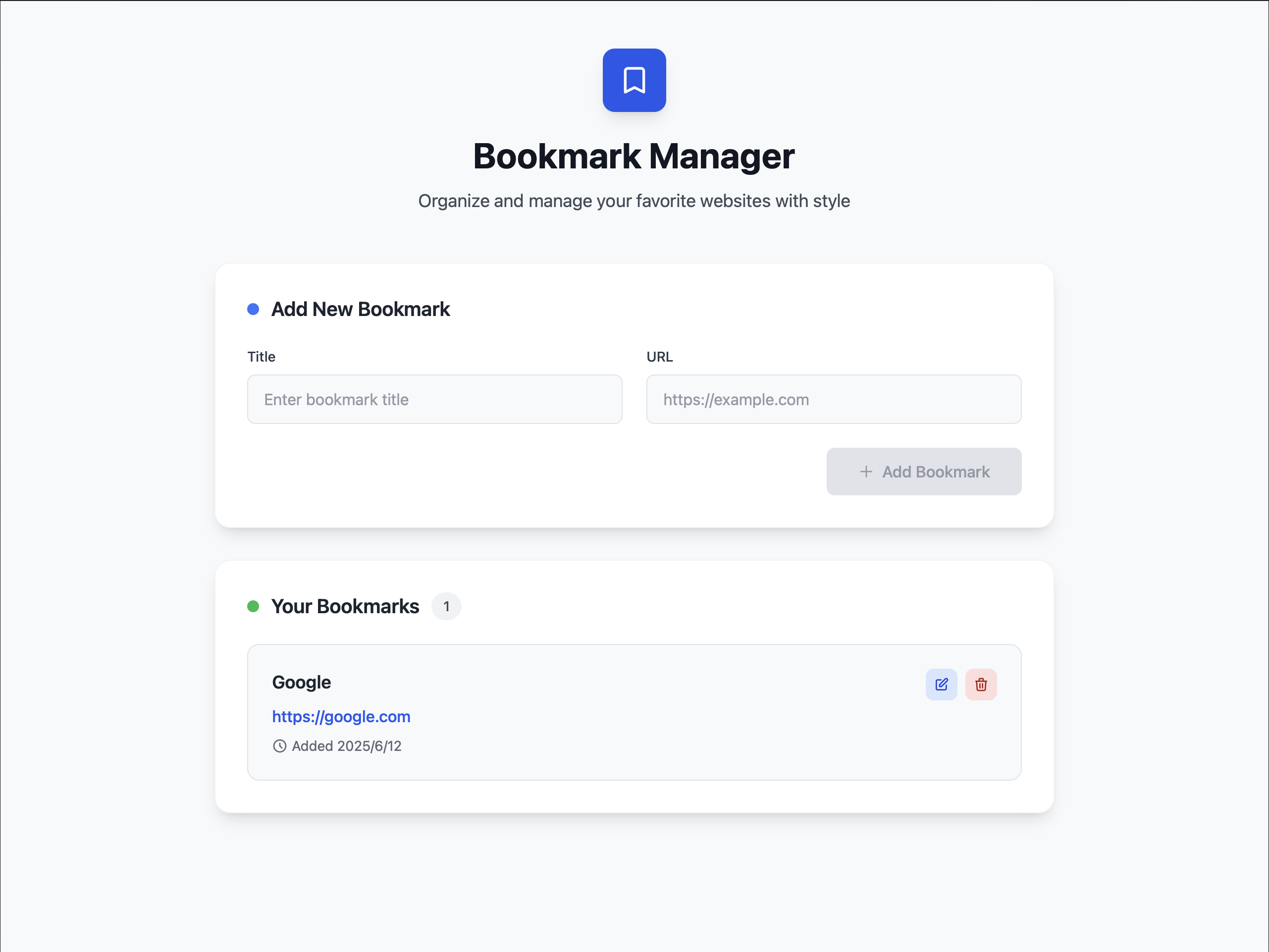
かなりいい感じのものが出来上がっていますね。計25分でこのフロントエンドが実装できるのは、素晴らしいとしか言いようがありません。
ブックマークの追加、編集や削除なども期待通りに動作していました。APIを通してのCRUD操作も正しく動作しており、システムとして十分に成立しています。
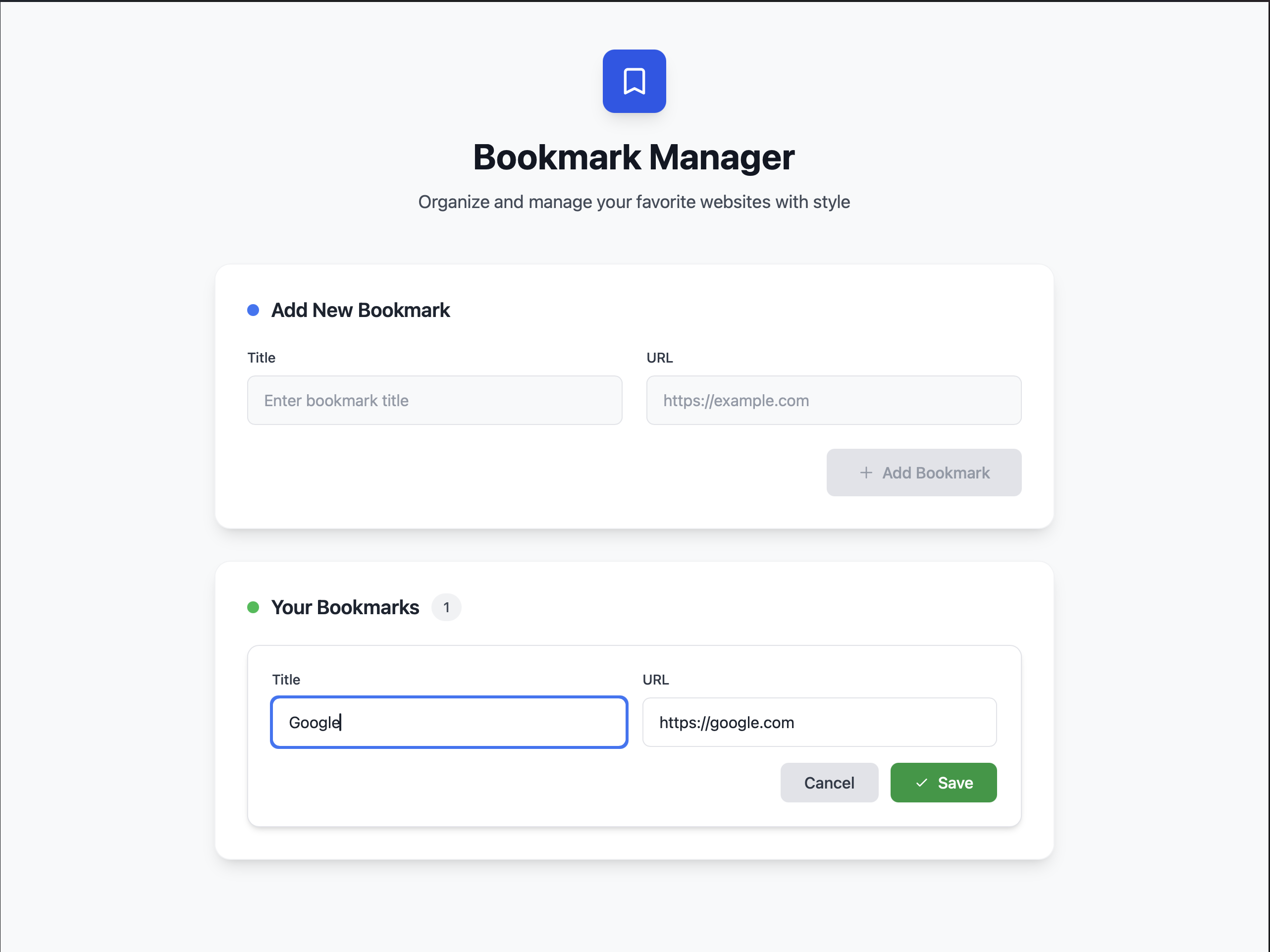
もちろん問題点をあえてあげつらうことは可能で、APIのURLがハードコーティングされているなどメンテナンス性の課題が存在したり、 エラーハンドリングが甘く実運用で困りそうだといった点は存在していますが、これだけ動作するのであれば十分に及第点でしょう。
かかったコスト
- DBおよびAPI定義
- 0.68 ACU
- バックエンドの実装
- 1.33 ACU
- フロントエンドの実装およびデザインのリファイン
- 2.83 ACU
- 計
- 4.84 ACU
合計で4.84 ACU、米ドルで10.89ドル。日本円で約1565円となります。 エンジニアに依頼するとなると結構かかりそうなものが、30分もしないうちに出来上がるのは素晴らしいです。
まとめ
CLIツールとWebシステムを作成させてみましたが、しっかり動作するものを仕上げてくれました。 途中で何度か追加の指示は出しましたが、大筋は外れていなかったと思います。
こちらが要件を曖昧にしてしまった部分を汲み取ってくれなかったり、初期のセットアップに手こずったりといったトラブルはありましたが、 続行不能になったり道をそれて戻ってこなくなったりといった致命的な問題は起こしていません。
魔法のようにすべてを解決してくれるわけでもないという現実的な妥協点も露わになりましたが、 それでも強力なエージェントであることは明らかです。Devinは現時点でも十分に実用的です。
余談
Devin WikiとAsk
Devinには「Devin Wiki」という、リポジトリのwikiを自動的に作成する機能があります。 少し前に話題になったDeepWikiは、これをパブリックリポジトリに適用できるようにしたものです。 Devin Wikiではプライベートリポジトリのwikiを作成できます。
プロジェクト構成やアーキテクチャ図などを作成してくれるので、リポジトリの内容理解の助けとなってくれます。 始めて参画するプロジェクトなのにドキュメントが整備されていない……という悩みも解決します。
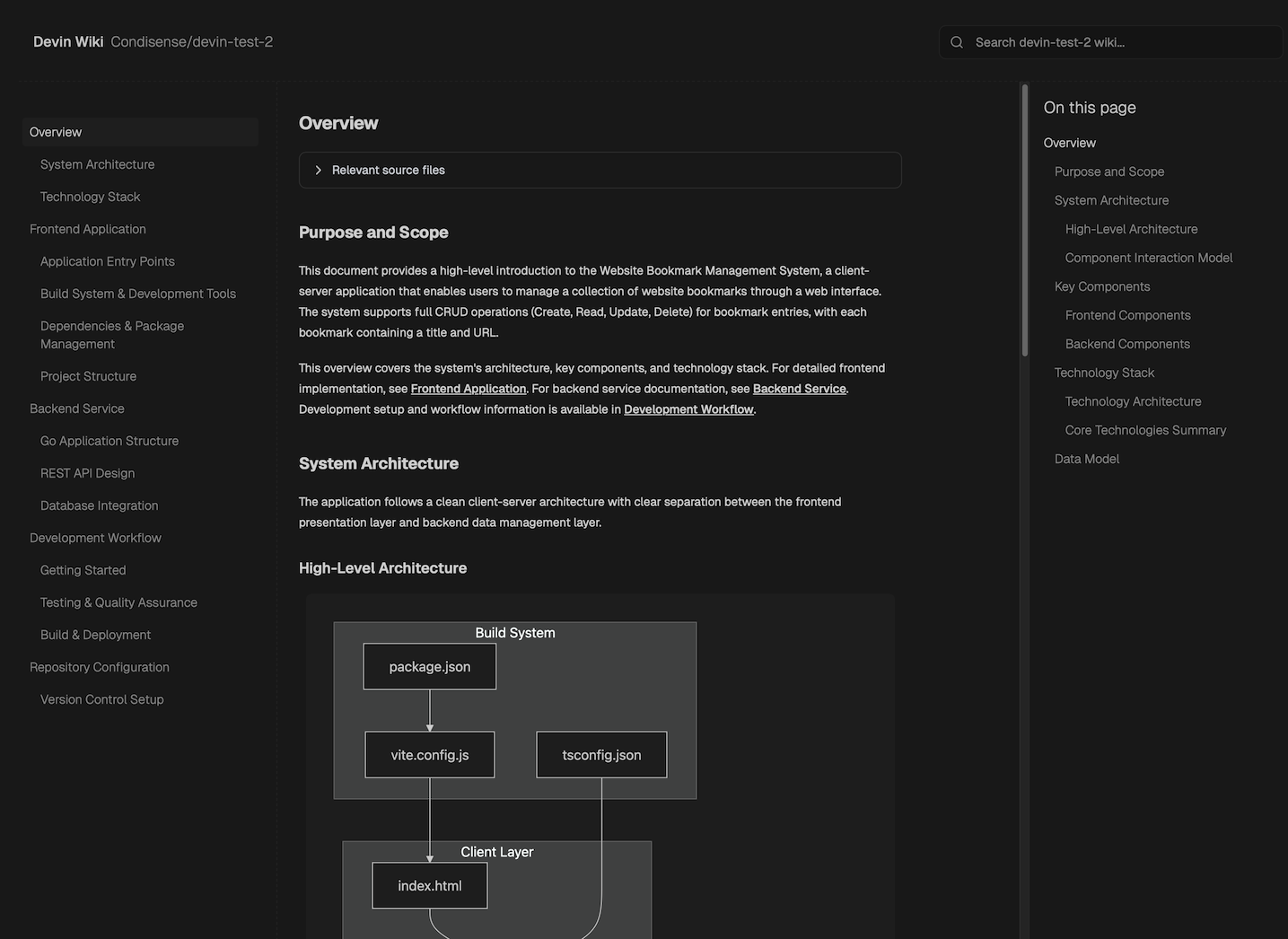
またDevinには、Agentモードの他にAskモードがあります。これは実際にタスクをこなすのではなく、単に質問に答えるだけの機能です。 他のエージェントで言うところのPlanやThinkという名前の機能に該当します。
例えば「xxxという関数がテスト困難だが、どのような手順でテスタブルにリファクタリングすべきか」「このシステムでDBに手動で値を追加したい場合はどのような操作をすればよいか」 などといった質問を気軽にすることができます。もちろん、タスクを実行してもらう前のプランニングに使用するのもよいでしょう。
単にタスクを代行してくれることだけがDevinの価値ではなく、わからない部分を一緒に解き明かしてくれるのも魅力のひとつになります。 Devinに任せるには複雑すぎるようなリポジトリでもまずはDevinと連携して、調査から一緒に始めていくことができます。
SlackやGitHubからでも動かせる
Devinは専用のWebUIからだけでなく、Slack上でやりとりをしたり、GitHubのPR上から追加の指示を出すこともできます。 Slackの日頃のやり取りと同じように開発タスクを依頼できるので、気楽に使用できますし、周囲からも何をやっているのかわかりやすくなります。
Devinをジュニア開発メンバーのひとりとしてSlackに迎えてみるのも、チーム内のコミュニケーション活性化に繋がるかもしれません。
Claude Codeについて
2025年7月現在、AIエージェントとしてはAnthropicのClaude Codeが最もホットでしょう。 もちろんコーディングのみを見るのであればClaude Code(およびSonnet4/Opus4)の優秀さに比肩するものはなかなかいないでしょう。 しかしながらターミナル上でコマンドを叩いて……となると、専門的な領域になってしまうことは否めません。
Devinの強みはSlackやWebUIから使用できることです。これはVSCodeやターミナルを使用するのが億劫な非エンジニアでもDevinを十分に活用できるということです。 ビジネスサイドやデザイナーにとって気になるところがあるが、わざわざエンジニアの手を煩わせたくはないといったときも、Devinに尋ねれば容易に把握できるようになります。
参考文献
- Introducing Devin, the first AI software engineer, https://www.cognition-labs.com/introducing-devin
- When to Use Devin - Devin Docs, https://docs.devin.ai/essential-guidelines/when-to-use-devin
- Instructing Devin Effectively - Devin Docs, https://docs.devin.ai/essential-guidelines/instructing-devin-effectively
- Pricing | Devin https://devin.ai/pricing
- チームでのDevin使いこなし術|suthio https://note.com/suthio/n/n193a73f9eed4
- Devinはどこまでできる?自律型AIエージェントDevinを2ヶ月試した結果を公開! - Findy Tech Blog https://tech.findy.co.jp/entry/2025/03/24/070000